Search Usage
A listing page has two search mechanisms. They look similar but they are not the same filter on the backend.
| Main search | Per-field search | |
|---|---|---|
| Where | The search bar on top of the listing | Inside the Filters panel, on a text field |
| Query param | ?search=foo bar | ?title_partial=foo, ?title=foo … |
| Backend filter | MySearchFilter / SearchTermsFilter | ApiPlatform\Doctrine\Orm\Filter\SearchFilter |
| Scope | All the configured fields at once, with OR clauses | One field, one strategy at a time |
Main search
One term, or many terms, searched in every field the entity has configured in its MySearchFilter. It also covers the nested relations, the translations and the shortcode IDs (ITY5 becomes id = 5).
GET /{resourceName}?search=foo barThe full behaviour (tokenizing, searchable fields, translation support, shortcode IDs and the case-insensitive matching) is documented on the backend side: MySearchFilter.
This one is not generated from the metadata. The CRUD generator skips
MySearchFilter when it reads
apiFilters, so the search bar is added
by the frontend on every listing, and it is the filter declaration on the
backend that decides which fields it really covers.
Per-field search methods
When a text filter has more than one strategy, we display a selector next to the input and the user picks how the term should be matched:
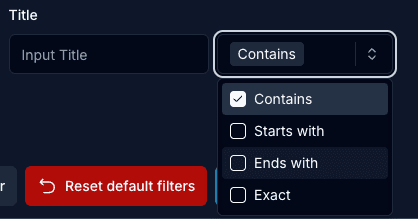
Every label is one API-Platform strategy, and every strategy sends a different query key:
| Selector label | Strategy | Query key |
|---|---|---|
| Contains | partial | {field}_partial |
| Starts with | start | {field}_start_with |
| Ends with | end | {field}_end_with |
| Exact | exact | {field} |
Only one strategy is active at a time. When the selector is changed, the keys of the other strategies are cleared and the typed value is moved to the new key, so the listing never sends two matches for the same field. If there is no value yet, the selector goes back to the first strategy of the list.
How it is generated
The selector is not written by hand per entity. It comes from the metadata, through the generator:
- The generator reads
apiFiltersand, for every property of theSearchFilterentry, it takes the declared strategy. - The strategies of a field are ordered by priority (
partial,start,end,exact) and stored asfilterFields.searchMethodsindata.json. More about it in Metadata API Usage. changes.jsonkeeps the same shape ("searchMethods": { "name": ["partial", "start", "exact"] }), so the list can be trimmed by hand for that entity. See the changes.json Reference.- The generated
index.tsxprintssearchMethodson the filter field, and ListingFilters displays the selector when there is more than one entry in it.
A few cases never get a selector:
- Relation filters. When the
propertiesof the filter is an array instead of a{property: strategy}object, no strategy is stored for it. - Translatable fields. A property declared as
translations.titleis kept as a translatable field and it is handled by the TranslationSearchFilter, not as a normal search field. textfields. They are removed from the filters list, because a textarea is not really a filter input.
Related
- MySearchFilter, the backend doc of the main search
- Translatable Search, searching inside the translations
- ListingFilters and Render Filter Fields, the components
- Query String, how the filter keys end up in the URL