Error Handling System
This document describes the complete error handling architecture in the application, from server-side detection to client-side rendering.
If you want to try to trigger an error to see an example, go here: [https://demo.dev.print.phpr.link/fr/bill/payment/100/en_CA/print/0 ]
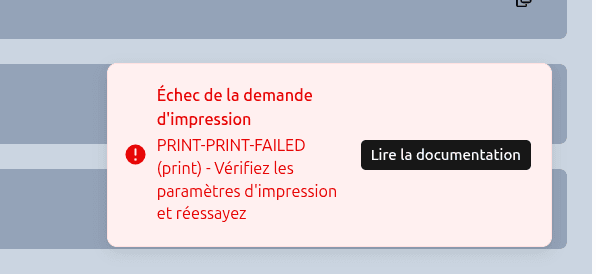
Overview
Errors are represented as typed string codes (e.g. "PUNCH-PUNCH-IN-FAILED").
They never cross the server/client boundary as exceptions — they are caught on the server,
logged to Sentry, and returned as structured data to the client.
Server Action
│
├── throwAppError("MY-CODE")    ←── throws AppErrorException
│
└── catch(err)
     ├── captureAppError(...)   ←── log to Sentry with context
     └── return { ok: false, error: "MY-CODE" }   ←── safe return

Client Component
│
├── res.ok == false  →  setError("MY-CODE")
└── <AppErrorRenderer error="MY-CODE" />
     │
     └── resolveError("MY-CODE")   ←── catalog lookup + i18n
          │
          └── <ErrorRenderer />   ←── final UI
System Layers
1. AppErrorException (external bundle)
All business errors are instances of AppErrorException.
This allows them to be distinguished from unexpected JavaScript errors in catch blocks.
import { AppErrorException } from "@phpcreation/frontend-utils-react-nextjs-bundle/errors";2. utils/appError.ts
// Throws an AppErrorException with the given code
export function throwAppError(code: string): never {
  throw new AppErrorException(code);
}

// Extracts the code from an AppErrorException, or returns the fallback
export function getAppErrorCode(error: unknown, fallbackCode: string): string {
  if (error instanceof AppErrorException) {
    return error.code;
  }
  return fallbackCode;
}| Function | Usage | Return |
|---|---|---|
throwAppError(code) | Inside try, when the API fails | never (throws an exception) |
getAppErrorCode(err, fallback) | Inside catch, to extract the code | string |
3. utils/captureAppErrors.ts
Called systematically in every server action catch block.
Enriches the error report with business context.
captureAppError({
  error: err,           // the caught exception
  operation: "quickPunch",
  userId: userId,
  tenant: tenant,
  payload: { taskId, description },  // data useful for debugging
  severity: "error",    // default — can be "warning", "info", etc.
});
Note:
captureAppErrornever re-throws the error. Its sole purpose is to send the information to Sentry.
4. errors/catalog.ts
Central file that defines every possible error code with its metadata.
export const ERROR_CATALOG = {
  "PUNCH-PUNCH-IN-FAILED": {
    code: "PUNCH-PUNCH-IN-FAILED",
    httpStatus: 400,        // documentary metadata only
    domain: "punch",
    ui: {
      level: "toast",
      message: "errorsLocal.punch.punchIn.requestFailed.message",  // i18n key
      action: "errorsLocal.punch.punchIn.requestFailed.action",    // i18n key
    },
    docs: {
      slug: "PUNCH-PUNCH-IN-FAILED",
      description: "errorsLocal.punch.punchIn.requestFailed.description",
      actions: [
        { label: "errorsLocal.punch.punchIn.requestFailed.action" },
        ...DEFAULT_ACTIONS,  // retry, checkNetwork, contactSupport
      ],
    },
  },
  // ...
};
Each entry has two display contexts:
| Key | Usage | Content |
|---|---|---|
ui | Quick display (toast) | level, message, action |
docs | Detailed display (modal, page) | description, list of suggested actions |
Important: The
httpStatusfield is purely documentary. It is not used to automatically route to the correct message. The developer explicitly chooses which code to throw based on the HTTP status received (see next section).
5. components/AppErrorRenderer.tsx
Client component that receives a string code, resolves it via resolveError, then
delegates rendering to ErrorRenderer.
<AppErrorRenderer error="PUNCH-PUNCH-IN-FAILED" />While the async resolution is in progress, a minimal red fallback is displayed.
Full Pattern — Server Action
Standard pattern to follow for every server action:
"use server"

export async function myServerAction(
  tenant: string,
  taskId: string,
  userId: string
): Promise<{ ok: true } | { ok: false; error: string }> {
  try {
    await checkRequireAuth();
    await applyRateLimit(userId);

    const res = await callPhprApi("POST", tenant, "/my/endpoint", "", body);

    // Explicitly map HTTP statuses to error codes
    if (!res || (res.status >= 400 && res.status < 500)) {
      throwAppError("MY-DOMAIN-ACTION-FAILED");           // 4xx → client error
    } else if (res.status >= 500) {
      throwAppError("MY-DOMAIN-ACTION-UNEXPECTED-ERROR"); // 5xx → server error
    }

    return { ok: true };

  } catch (err) {
    captureAppError({
      error: err,
      operation: "myServerAction",
      userId,
      tenant,
      payload: { taskId },
    });

    return {
      ok: false,
      error: getAppErrorCode(err, "MY-DOMAIN-ACTION-FAILED"), // fallback if error is unknown
    };
  }
}
Error Code Naming Convention
Codes follow the pattern: DOMAIN-RESOURCE-DESCRIPTION
PUNCH  -  PUNCH-IN   -  FAILED
PUNCH  -  TIMESHEET  -  ADD-FAILED
PUNCH  -  KVS        -  FETCH-UNEXPECTED-ERROR
  ↑           ↑                  ↑
domain     resource           nature
Each resource must have exactly two codes:
| Suffix | HTTP Status | Meaning |
|---|---|---|
*-FAILED | 4xx | Client error (invalid data, resource not found…) |
*-UNEXPECTED-ERROR | 5xx | Unexpected server error |
Adding a New Error
Step 1 — Declare the code in the catalog
// errors/catalog.ts

"MY-DOMAIN-ACTION-FAILED": {
  code: "MY-DOMAIN-ACTION-FAILED",
  httpStatus: 400,
  domain: "my-domain",
  ui: {
    level: "toast",
    message: "errorsLocal.myDomain.action.failed.message",
    action: "errorsLocal.myDomain.action.failed.action",
  },
  docs: {
    slug: "MY-DOMAIN-ACTION-FAILED",
    message: "errorsLocal.myDomain.action.failed.message",
    description: "errorsLocal.myDomain.action.failed.description",
    actions: [
      { label: "errorsLocal.myDomain.action.failed.action" },
      ...DEFAULT_ACTIONS,
    ],
  },
},
Step 2 — Add the i18n keys
{
  "errorsLocal": {
    "myDomain": {
      "action": {
        "failed": {
          "message": "The action failed.",
          "action": "Retry the operation",
          "description": "The request could not be completed. Please check your data."
        }
      }
    }
  }
}
Step 3 — Use in the server action
if (res.status >= 400 && res.status < 500) {
  throwAppError("MY-DOMAIN-ACTION-FAILED");
} else if (res.status >= 500) {
  throwAppError("MY-DOMAIN-ACTION-UNEXPECTED-ERROR");
}
Step 4 — Display in the client component
const res = await myServerAction(tenant, taskId, userId);

if (!res.ok) {
  setError(res.error);
  return;
}

// In JSX:
{error && <AppErrorRenderer error={error} />}
Default Common Actions
All errors automatically include these three actions via DEFAULT_ACTIONS:
| i18n Key | Suggested Action |
|---|---|
errorsLocal.punch.common.retryOperation | Retry the operation |
errorsLocal.punch.common.checkNetwork | Check network connection |
errorsLocal.punch.common.contactSupport | Contact support |