Search Implementation
This documentation page outlines the implementation details of the search functionality used in the documentation site.
Overview
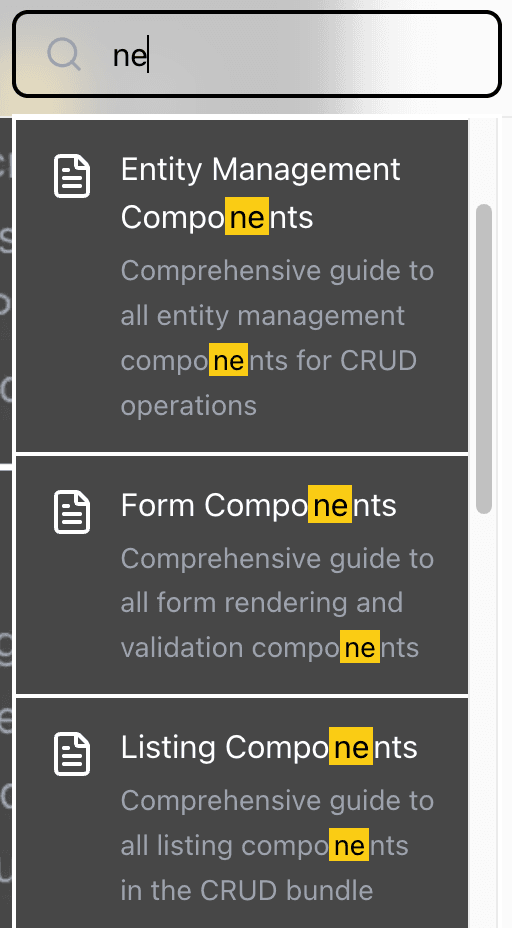
Image of the search component:
How It Works
The search system follows a simple flow:
- Build Time: The
generate-search-index.jsscript runs duringprebuildto scan all MDX files and create a search index - Storage: The index is stored as
app/search-index.json - API Endpoint: An API endpoint serves the search index to the frontend
- Frontend: The SearchComponent fetches the index via the API endpoint
- Middleware: Requests go through Next.js middleware for processing
- Search: Client-side search runs against the loaded index with real-time results
Files
scripts/generate-search-index.js
- Recursively scans the content directory for
.mdxand.mdfiles - Reads each file and extracts frontmatter using gray-matter
- Cleans content by removing code blocks, inline code, and markdown formatting
- Generates URL-friendly slugs from file paths
- Limits preview to 200 characters and searchable content to 3000 characters
- Writes the complete index to
app/search-index.json
app/search-index.json
- Stores the generated search index as a JSON array
- Contains entries with: slug, title, description, content, keywords, category, fullContent
- Served as a static file accessible at
/search-index.json - Loaded by the frontend on component mount
app/api/search-index/route.ts
- Defines a GET API route at
/api/search-index - Reads and returns the contents of
app/search-index.json
components/SearchComponent.tsx
- Fetches
/api/search-indexwhen component mounts - Listens for user input with 200ms debouncing
- Splits search query into words and scores each document
- Ranks results by score (title matches > keywords > description > content)
- Highlights matched terms in yellow
- Displays top 10 results in a dropdown
Setup
Add to package.json:
{
  "scripts": {
    "prebuild": "node scripts/generate-search-index.js",
    "build": "next build"
  }
}
The search index is automatically regenerated before every build.
Last updated on