Semantic releases
Introduction:
The purpose of having Semantic-Release is so that we can release workable versions to our users frequently. So we shouldn’t be releasing non-workable versions, so before we began to use semantic release, we should have our working branches ready, and releases should only happen in the master branch.
We need 3 main components:
- Git hook: we will use husky .
- commitlnt: it will act as linter for our commit messages.
- Semantic-release: It will use the commit history, that are respecting the Conventional commit standards, to generate Release notes and versions automatically.
Commit Conventions:
Conventional Commits provides an easy set of rules for creating an explicit commit history; which makes it easier to write automated tools on top of .
Conventional Commits standards Official website
To achieve such, we need to install a package called Commitlint.
Commitlint is the ESLint for commit messages. It performs validations on any text against a predefined commit format.
We can configure these formats to our needs or adopt pre-built-in conventions, such as conventional commits.
We create a file under .husky folder, #!/usr/bin/env sh
. "$(dirname -- "$0")/_/husky.sh"

npx commitlint --edit
And finally we create a config file commitlnt.config.js where we specify the conventions
module.exports = {
  extends: ['@commitlint/config-conventional'],
};
General structre of a commit message
<type>(<scope?>): <subject!>Where:
type:
IThe type is mandatory and determines the intent of the change. Here are possible values:
build: changes affecting build systems or external dependenciesci: updating configuration files for continuous integration and deployment serviceschore: updating grunt tasks etc.; no production code changedocs: documentation-only changesfeat: a new featurefix: a bug fixperf: a code change that improves performance -refactor: a code change that neither fixes a bug nor adds a featurestyle: changes that do not affect the meaning of the code (white-space, formatting, missing semicolons, etc.)test: adding missing tests or correcting existing testsBREAKING CHANGE: Major update.
Scope
A scope is an optional value that provides additional contextual information about the change. For example, when the module’s name, npm package, or particular routine was affected.
Subject
The subject is the headline of the commit. It should summarize in one sentence the nature of change.
For the subject, consider the following rules:
- use the imperative, present tense: “change,” not “changed” nor “changes”
- do not capitalize the first letter
- no dot (.) at the end
Github wokrflow for semantic release
First, we need to install package called Semantic-release
npm install -D semantic-release.
Next, we add the plugings and config to package.json so we inform semantic-release about pluging and the branch of release.
 "plugins": [
    "@semantic-release/commit-analyzer",
    "@semantic-release/release-notes-generator",
    "@semantic-release/changelog",
    "@semantic-release/github",
    "@semantic-release/npm",
    "@semantic-release/git"
  ],
  "release": {
    "branches": [
      "main"
    ],
    "tagFormat": "${version}",
    "publish": [
      "@semantic-release/github"
    ],
    "prepare": [
      "@semantic-release/npm",
      "@semantic-release/changelog",
      {
        "path": "@semantic-release/git",
        "message": "release ${nextRelease.version}\n\n${nextRelease.notes}"
      }
    ]
  }
Finally,under .github/workflows/, we create file called: semantic-release.yml that will actually be triggered manually evertime we need to release a new version.
Workflow details are bellow :
name: Semantic release

# for manual action triggering.
on: [workflow_dispatch]

jobs:
  publish:
    runs-on: ubuntu-latest
    steps:
      - uses: actions/checkout@v3
      - name: Cache node modules
        id: cache
        uses: actions/cache@v3
        with:
          path: node_modules
          key: cache-node-${{ hashFiles('package-lock.json') }}
      - name: Setup Node
        uses: actions/setup-node@v1
        if: steps.cache.outputs.cache-hit != 'true'
        with:
          node-version: 16
      - name: Install packages
        if: steps.cache.outputs.cache-hit != 'true'
        run: npm install

      - name: Launch Semantic release
        env:
          GITHUB_TOKEN: ${{ secrets.GITHUB_TOKEN }}
        run: npx semantic-release
Since the build is triggered manually, we need to head to Github Actions section then find semantic Release workflow, and trigger it on branch main.
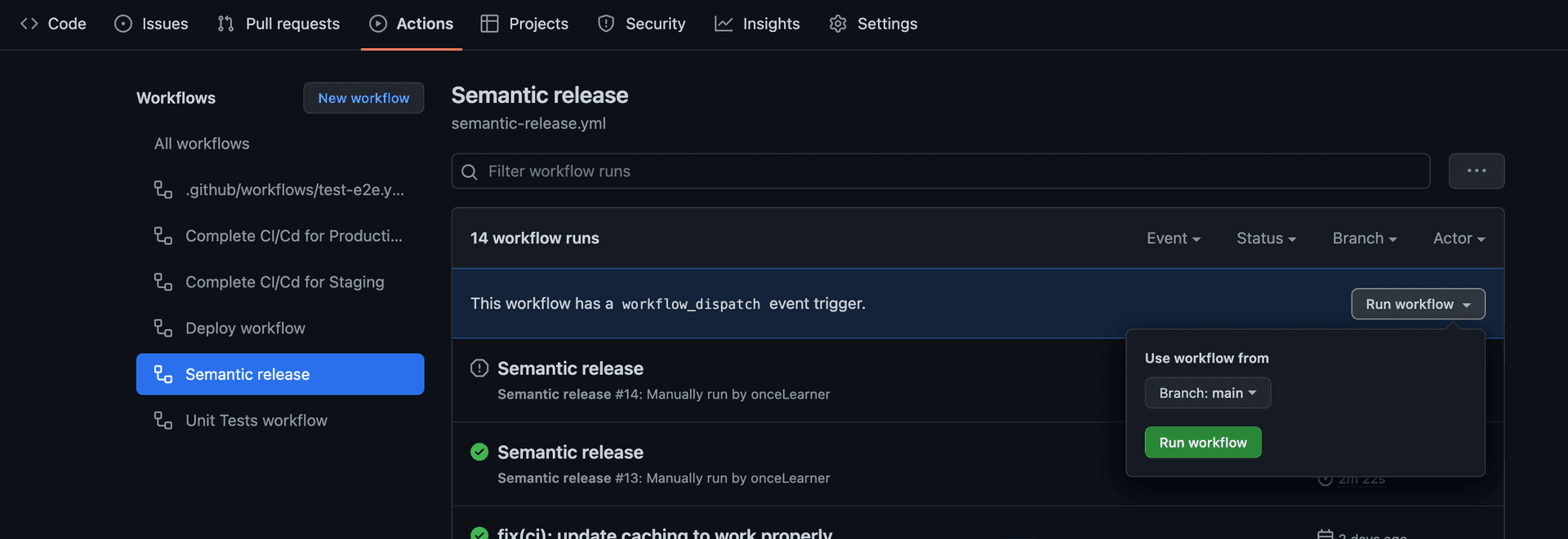
Note that :
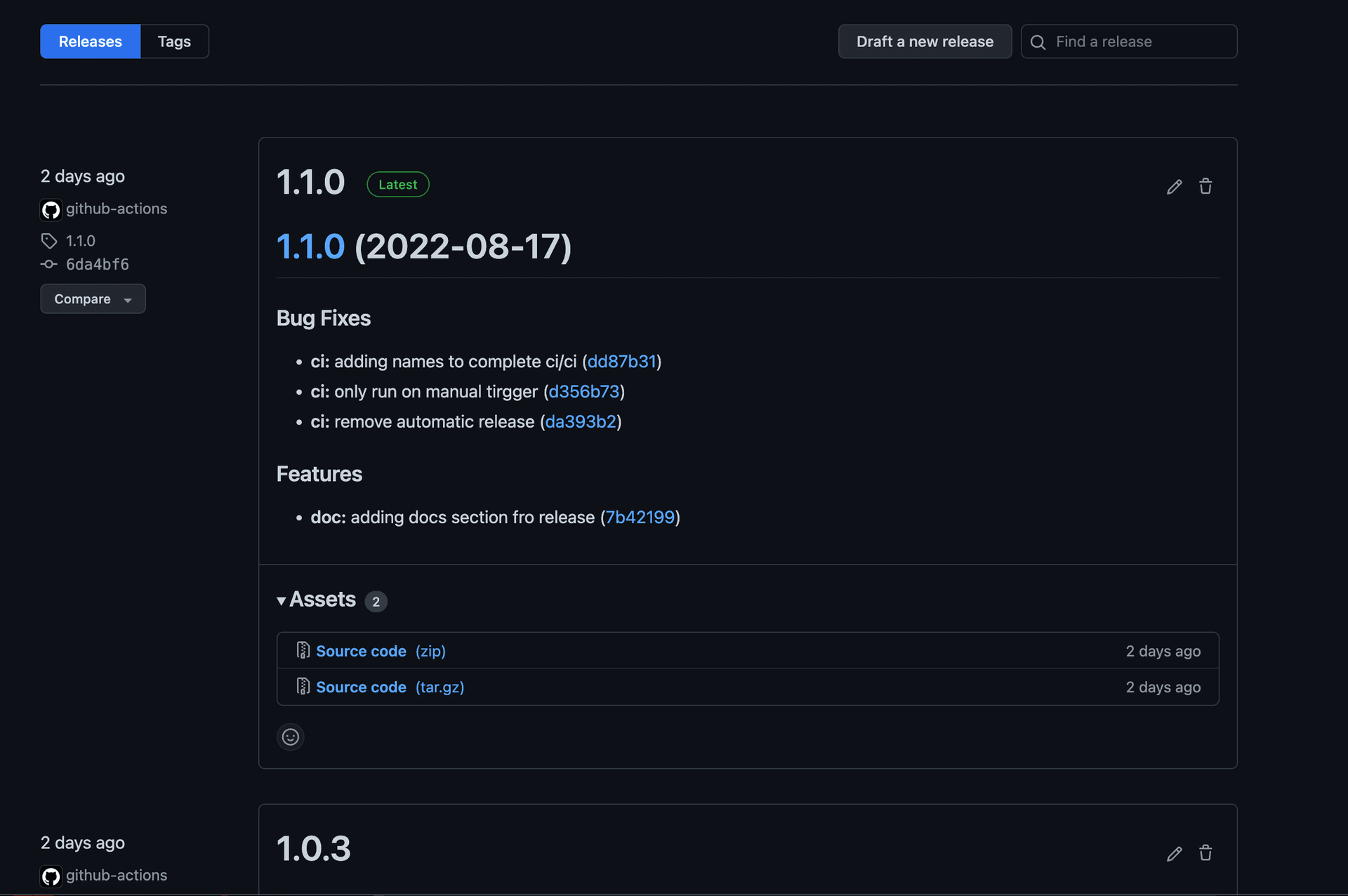
feat:....commmit message will bump the minor version of the release ‘major:minor:patch’fix:....commit message will bump the patch version of the release ‘major:minor:patch’BREAKING CHANGEcommit message will trigger a major bump to the version.
Result :
Using the right bundle versions in package.json
In package.json, packages listed as dependencies or devDependencies (or any other type) have the following structure:
"dependencies": {
    "@phpcreation/frontend-auth-authorization-flow-react-nextjs-bundle": "^2.13.3",
    ...
}
The dependencies object contains key-value pairs that hold the package name as a key, then the version number as a value.
Version range handling
The pnpm package manager will usually select versions within a range in the following way:
"2.0.0"=> Exact Version"~2.0.0"=> Patch updates only"^2.0.0"=> Compatible updates only
Compatible updates only allow dependency updates while keeping the major version intact. This allows mostly up-to-date versions while avoiding most breaking changes (1.y.z).
Patch updates only will only allow patch updates, these will keep the major version along with the minor version intact and only permit patch versions (1.1.z).
Note that multiple package managers, such as npm and pnpm, will enforce stricter update rules on packages with pre 1.0 versions (^0.y.z) because pre-1.0 packages often introduce breaking changes in minor releases. In such cases, the ^ rule will behave like the ~ rule. (It might not apply if the version range used is “0” instead of the use of “^0.0.0”, bypassing this rule)
Good practices
- Use caret (^1.0.0) in phpcreation bundles to ensure packages get updated to their latest compatible versions.
- AVOID using exact versions unless you know what you are doing.
- Use
pnpm updateto update dependencies to the latest versions allowed by package.json. Useful when needing to apply fixed and new features from bundles in your app. - Ensure pnpm-lock.yaml (or package-lock.json, for older repositories not transferred to pnpm) is committed once edited by pnpm. This ensures deployments and CI environments install the exact same dependency versions.