Lang Translations API & Usage
How multi-language content works in the ERP CRUD: the lang_translations API, the TranslatableInterface that entities implement, and the read/write flow the frontend uses.
Two kinds of translation
| System | What it translates | Where it lives |
|---|---|---|
UI translations (react-intl) | Static interface strings (labels, buttons, sections) | messages JSON files in each app (en.json / fr.json) — see App Setup |
| Lang Translations (this page) | Entity data (a title, a description) per locale | Backend API, stored as lang_translations rows |
This page is about the second one. The translatable entity data.
Which entities are translatable
An entity becomes translatable on the backend by implementing PHPReaction\Entity\LangBundle\TranslatableInterface. You’ll see it listed in the entity’s implementedInterfaces metadata, next to the other behaviours it supports like Prioritizable, Sluggable, or Disableable. The CRUD generator picks that up and turns it into a simple translatable flag:
const implementedInterfaces = {
  translatable: true,
  // ...
};
Once that flag is on, the CRUD adds a language switcher to the create and edit forms, the Translation Modal for editing every locale at once, translation-aware search filters, and translatable content in the quick show panel.
For the details on either side of this, see the frontend interface map, the backend interface behaviour, and the backend implementation (listeners, doctrine filters, and the query params).
Reading translations
A translatable entity resolves its translation for whatever locale the request is in (set with the _locale query param) and returns the result inline. So a plain GET on an invoice_type already gives you the translated title for the current locale, along with a few helper fields:
{
  "title": "Title en",
  "resolvedLocale": "en_CA",
  "resolvedLocaleMessage": "Translation for en_CA found.",
  "noTranslationForTitle": false,
  "noTranslationForDescription": true,
  "missingCurrentLocaleTranslation": false,
  "translationsListing": "/open-api/v3/invoice_typetranslations?translatable=333"
}
You mostly just read title and description. The resolvedLocaleMessage, noTranslationFor*, and missingCurrentLocaleTranslation fields are there so the UI can warn the user when a locale hasn’t been filled in yet.
If you need the raw translation rows rather than the resolved value, every translatable entity exposes a translationsListing link to its own rows, and you can query the shared table directly:
GET /open-api/v3/invoice_typetranslations?translatable=333
GET /open-api/v3/lang_translations?title=QST
The lang bundle also exposes langs (the languages themselves), lang_language, and lang_alerts, and each translatable entity has its own translations resource such as invoice_typetranslations or bill_linetypetranslations.
description is stored in lang_translations exactly like title, but it
isn’t exposed as a virtual property in the entity metadata yet, so
virtual_properties only lists title. See
phpreaction-frontend-crud-react-v2#1159 .
Writing translations
When you create or edit an entity, send every locale at once in an apiTranslations object, keyed by locale:
{
  "priority": 1,
  "apiTranslations": {
    "en_CA": { "title": "Title en", "description": "" },
    "fr_CA": { "title": "Titre fr", "description": "" },
    "es": { "title": "", "description": "" }
  }
}
In a form this is just the shape React Hook Form holds for you (see Form Components):
const form = useForm({
  defaultValues: {
    priority: 1,
    apiTranslations: {
      en_CA: { title: "", description: "" },
      fr_CA: { title: "", description: "" },
      es: { title: "", description: "" },
    },
  },
});
Don’t send a bare translations object like { "translations": { "title": "…" } }. The API can’t denormalize that and fails with Could not denormalize object of type "…TranslationInterface[]", no supporting normalizer found. Always use the locale-keyed apiTranslations shape. See phpreaction-frontend-crud-react-v2#248 .
The translation modal
You never build the apiTranslations object by hand in a form. When an entity is translatable, the quick-add and quick-edit modals drop in the TranslatableFields panel, and that panel is what fills apiTranslations for you.
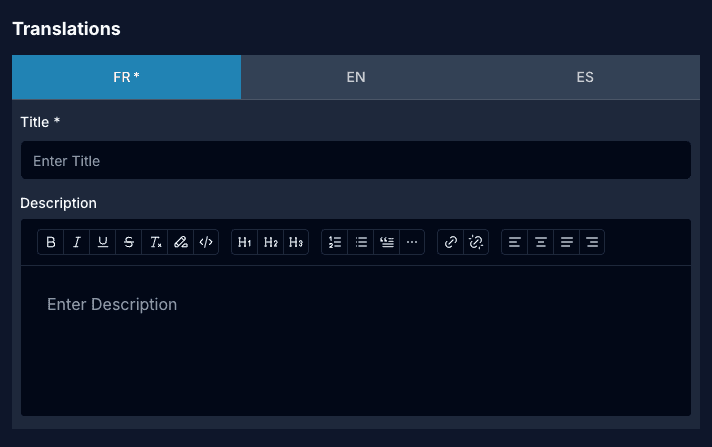
It’s a set of tabs, one per language (French, English, Spanish by default), and each tab holds that locale’s title and description. French comes first and its title is marked required with a *; the others are optional. As you type, the panel writes straight into apiTranslations.fr_CA.title, apiTranslations.en_CA.title, and so on, so the value that leaves the modal is already in the shape the API wants. Validation errors from every locale are collected under the tabs and shown together, each prefixed with the language it came from, e.g. [EN] EN title is required, so a user can’t miss a required field just because it lives on a tab they never opened.
Which locales are required
Only the French title is required by default. A few entities need more than that. Products, for example, expect a title in French, English, and Spanish, and posting one with the others blank comes back as a validation error:
translations[en_CA].title: This value should not be blank.
translations[es].title:    This value should not be blank.
Right now the frontend only finds this out after the request fails, because the required locales aren’t in the metadata yet. Exposing required locales in metadata (so forms can mark them up front) is planned: generator#273 and generator#274 .
Languages and fallback
Languages are referenced by a slug, for example fr_CA for French or en_CA for English, and that same list feeds the language menu in the footer. When a translation is missing for the current locale the entity doesn’t just blank the field: it tells you through resolvedLocaleMessage ("No translations were found for this resource") and the noTranslationFor* flags, so the UI can react.
The translations sidebox
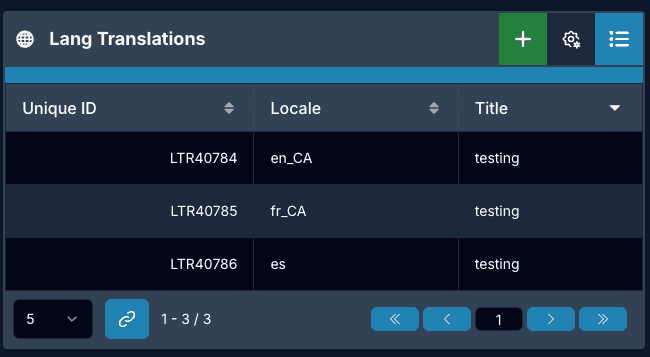
Translations also show up as a sidebox on a record’s detail/show page: the translatable rows for the current record, embedded under it, with a quick-add modal that opens the same TranslatableFields panel. It adds no new translation behaviour of its own, it’s the same read/write flow described above, just embedded in a parent’s detail view. The sidebox mechanics (lazy loading, header actions, deep-linking, print behaviour) and how it fits the broader record-binding relations are documented in Sideboxes & Relations.
How the apps use it
The POS app pulls translations from the API (/open-api/v3/lang_translations?title=…) and lets them override its static messages files, with caching to keep the calls cheap (pos#326 ). Inventory adds its own custom translations for entity labels (inventory#249 ), and Login is getting full Spanish support (login#498 ).
Related
Components:
- Translatable Fields — locale switching inside a form
- Translation Modal — edit every locale in one panel
- Entity Management — the
translatableandmanagingTranslationsstate - Entity Interfaces — where the
translatableflag comes from
Tracking issues: