Tree View
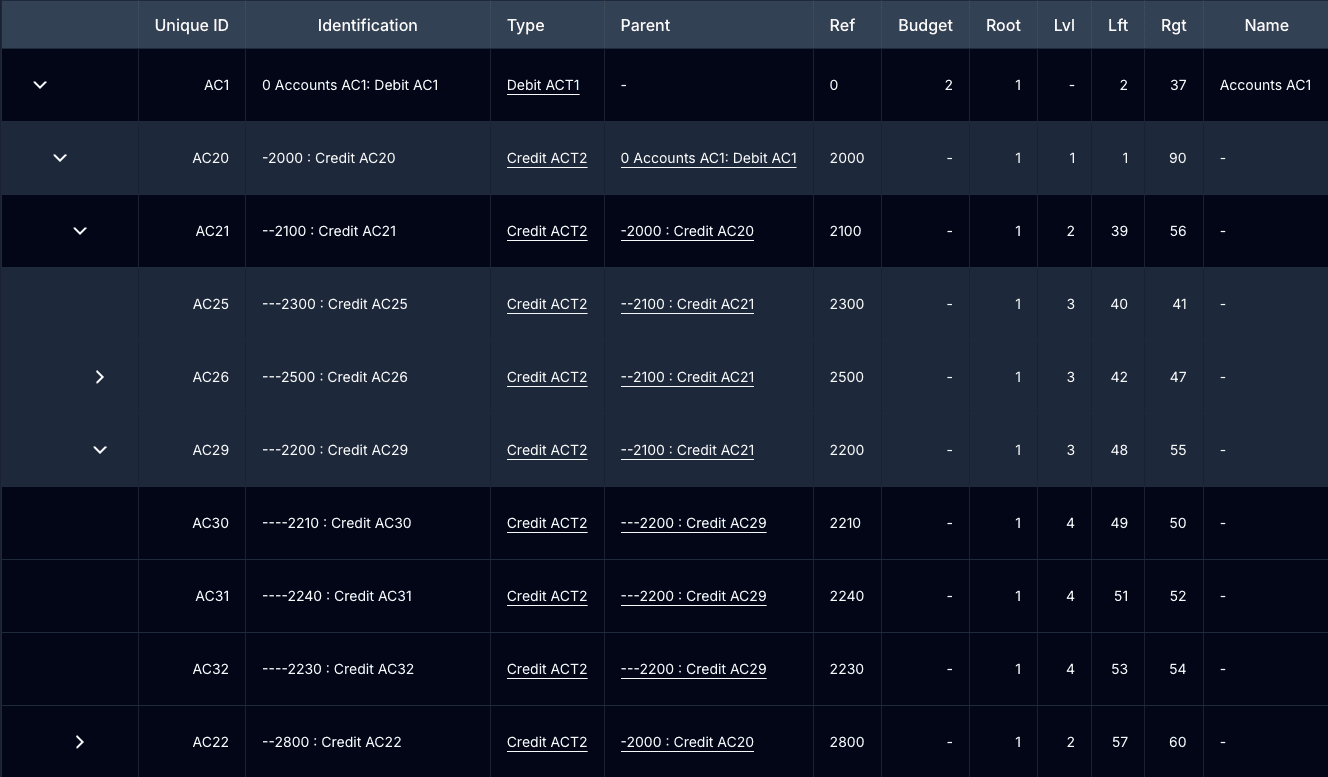
Tree view is a listing mode for entities that form a parent-child hierarchy: product types, accounts, tasks, skills, company types. The API stores these entities using the Nested Set Model, and the frontend renders them as a collapsible tree instead of a flat table.
It is not a separate component you mount. It is a route. /{locale}/{entity}/treeview renders the same Listing container as the flat listing, and ListingTable switches to tree rendering when the third path segment is treeview.
The Nested Set Model
Each tree entity carries five structural fields from the API:
{
  parent: Entity | null; // direct parent relation
  root: number; // id of the tree's root node
  lvl: number; // depth, root = 0
  lft: number; // left boundary
  rgt: number; // right boundary
}
lft and rgt come from walking the tree once and numbering each node on the way down (lft) and on the way back up (rgt). Everything between a node’s lft and rgt is its descendant. A leaf has rgt - lft = 1.
Sample tree, a fruit classification:
The same tree as the API returns it:
| Node | lvl | lft | rgt | Type | Parent |
|---|---|---|---|---|---|
| FRUIT | 0 | 1 | 22 | Root | none |
| AGRUME FAMILY | 1 | 2 | 9 | Branch | FRUIT |
| Orange | 2 | 3 | 4 | Leaf | AGRUME FAMILY |
| Citrus | 2 | 5 | 6 | Leaf | AGRUME FAMILY |
| Grapefruit | 2 | 7 | 8 | Leaf | AGRUME FAMILY |
| VITACEAE FAMILY | 1 | 10 | 13 | Branch | FRUIT |
| Grape | 2 | 11 | 12 | Leaf | VITACEAE FAMILY |
| ROSE FAMILY | 1 | 14 | 21 | Branch | FRUIT |
| Strawberry | 2 | 15 | 16 | Leaf | ROSE FAMILY |
| Raspberry | 2 | 17 | 18 | Leaf | ROSE FAMILY |
| Apple | 2 | 19 | 20 | Leaf | ROSE FAMILY |
Why this matters for the frontend: any structural change is not local to one node. Inserting a “Berry Sub-Family” under ROSE FAMILY and moving Strawberry and Raspberry into it renumbers lft/rgt across the whole tree (FRUIT becomes 1..24). The backend owns that renumbering. The frontend only tells it what moved, then refetches.
Enabling tree view for an entity
Tree view is driven by the entity’s crud_config in the consumer app:
// src/crud_config/product_types/index.tsx
const implementedInterfaces: { [key: string]: boolean } = {
  treeview: true,
  // ...
};

const actions = [
  // ...
  "priority-up",
  "priority-down",
  "tree-up",
  "tree-down",
];
implementedInterfaces.treeview is passed to the listing as hasTreeView. That does two things:
- Shows a Tree View button in the listing header (binary tree icon) linking to
/{locale}/{entity}/treeview. Visibility also goes throughgetRoleAccessbility(user?.roles, resource, "tree-view"). - Adds the tree filter to the filters panel.
The consumer apps ship the route at src/app/[locale]/[entity]/treeview/page.tsx; it renders the same ListingContainer as the flat listing page.

How the table renders
ListingTable builds the hierarchy client-side with useTreeView from the flat page of data (parent for structure, lvl for depth). On top of the normal columns it:
- Prepends an expander column. Rows are indented 20px per level; nodes with children get a chevron that expands or collapses the subtree.
- Renders Expand All and Collapse All buttons above the table.
- Sorts siblings by
lftascending, so the order you see is the order stored in the tree. Nodes withoutlftfall back to the configured sort field, thenid. - Keeps the expansion state when data refetches (after a move, an inline edit, a filter change), so the tree does not collapse under you.
Deep-linking to a node
The route accepts ?anchor=<id>. The table expands that node’s ancestors, scrolls to the row, and highlights it. Tree Position on the show page links back to the tree this way.
/en/product-type/treeview?anchor=42Reordering: tree up / tree down
On the treeview route each row shows Tree Up and Tree Down actions. They swap the current node with its adjacent sibling under the same parent:
PATCHthe current node with the sibling’slft/rgt.PATCHthe sibling with the current node’slft/rgt.- Refetch the listing. The backend recomputes the subtree numbering, so descendants follow their parent and keep their relative order.
The buttons disable at the edges: the first sibling cannot move up, the last cannot move down. Moving never changes the node’s parent or level.

Tree order vs priority order
The same entity can have two orderings, and the buttons look identical (chevron up/down), so know which one you are on:
| Priority Up / Down | Tree Up / Down | |
|---|---|---|
| Shown on | flat listing only | treeview route only |
| Field updated | priority | lft / rgt |
| Scope | swaps with the adjacent row on the page | swaps with the adjacent sibling under the same parent |
| Tooltip | ”Priority Up” / “Priority Down" | "Tree Up” / “Tree Down” |
ListingActions never renders both at once: priority-up/priority-down are hidden on the treeview route, tree-up/tree-down are hidden off it. See ListingActions for the full action key list.
Tree filter
With hasTreeView, the filters panel gains a two-part tree filter (the TreeFilter component): a Group by combobox to pick a node of the entity, and a Hierarchy combobox to pick which part of that node’s subtree to list. It works on both the flat listing and the treeview route.
Each hierarchy option translates to nested-set range filters on the API:
| Option | Value | Query parameters | Result |
|---|---|---|---|
| Related | related | lft_range[gte], rgt_range[lte], root | selected node + all descendants |
| Childs | childs | lft_range[gt], rgt_range[lt], root | all descendants, excluding the node |
| Childs Direct | childs-direct | lft_range[gt], rgt_range[lt], root, lvl | direct children only |
| Childs Indirect | childs-indirect | lft_range[gt], rgt_range[lt], root, lvl_range[gt] | grandchildren and deeper |
| Target | target | lft, rgt, root | only the selected node |
With the fruit sample: selecting ROSE FAMILY (lft 14, rgt 21) with Childs lists Strawberry, Raspberry and Apple, because their lft/rgt all fall inside 14..21.
The filters land in the URL query string like any other listing filter, so a filtered subtree is shareable.
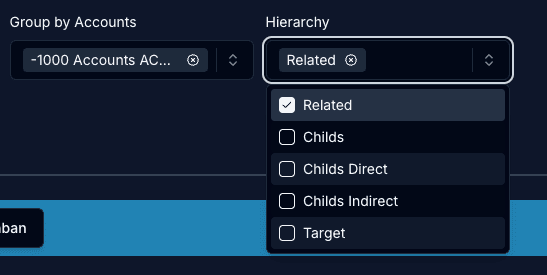
Changing hierarchy resets any previous nested-set params (lft, rgt,
root, lvl, ranges) before applying the new ones, so options do not stack.
On the show page
Tree entities get a Position section on their detail page showing the root, parent, previous and next sibling with their lvl/lft/rgt values, plus an ancestor breadcrumb. See Tree Position.
Related
- useTreeView builds and manages the client-side tree
- useTreeNeighbors fetches root, siblings and ancestors for one node
- Tree Position show-page section
- ListingActions tree-up / tree-down action keys
- ListingFilters hosts the tree filter
- ListingContext
handleTreeMoveItem