CI/CD Pipeline
Introduction
-
Continuous Integration (CI)
CI allows different developers to upload and merge code changes in the same repository branch on a frequent basis. Once the code has been uploaded, it’s validated automatically by means of unit and integration tests (both the uploaded code and the rest of the components of the application). In case of an error, this can be corrected more simply. -
Continuous Delivery (CD)
CD, the new code that’s been introduced and that’s passed the CI process is automatically published in a production environment (this implementation may require manual approval). What’s intended is that the repository code is always in a state that allows its implementation in a production environment.
Github Actions
GitHub Actions is a task automation system fully integrated with GitHub. It came
out of beta and reached general availability in November 2019. It has the potential
for many applications, including continuous integration and continuous deployment.

To automate a set of tasks, we need to create workflows in our GitHub repository. GitHub looks for YAML files inside of the .github/workflows directory. Events like commits, the opening or closing of pull requests, or updates to the project’s wiki, trigger the start of a workflow. For a complete list of available events, refer to this documentation.
Workflows are composed of jobs, which run concurrently by default. Each job should represent a separate part of our workflow. For example, we could have one job for running our tests, another for releasing our software, and a third for deploying to our production environment. we can configure jobs to depend on the success of other jobs in the same workflow. For example, failing tests can prevent deploying to production.
Jobs contain a list of steps, which GitHub executes in sequence. A step can be a set of shell commands or an action, which is a pre-built, reusable step implemented either in TypeScript or inside a container. Some actions are provided by the GitHub team, while the open-source community maintains many more. The GitHub Marketplace keeps a catalog of known open-source actions.
Example
name: GitHub Actions Demo
on: [push]
jobs:
  Explore-GitHub-Actions:
    runs-on: ubuntu-latest
    steps:
      - name: Check out repository code
        uses: actions/checkout@v3
      - name: run simple script
      - run: echo "🎉 The job was automatically triggered by a ${{ github.event_name }} event."
Approach in the context of PHPR UI
We need to create a new folder named .github, and a folder within the new folder named workflows.
Within the workflows folder, we will create new files named :
.
├── build-test-deploy-prod.yml
├── build-test-deploy-staging.yml
├── deploy.yml
├── semantic-release.yml
├── test-static.yml
├── test-unit.yml
└── test-e2e.yml
First,the file named test-static.yml is the workflow responsible for runnign ‘linting’ or static tests, whereas the file named test-unit.yml is responsible for running the unit tests, while test-e2e.yml is responsible for running cypress End2End tests. Meanwhile, deploy.yml is containing
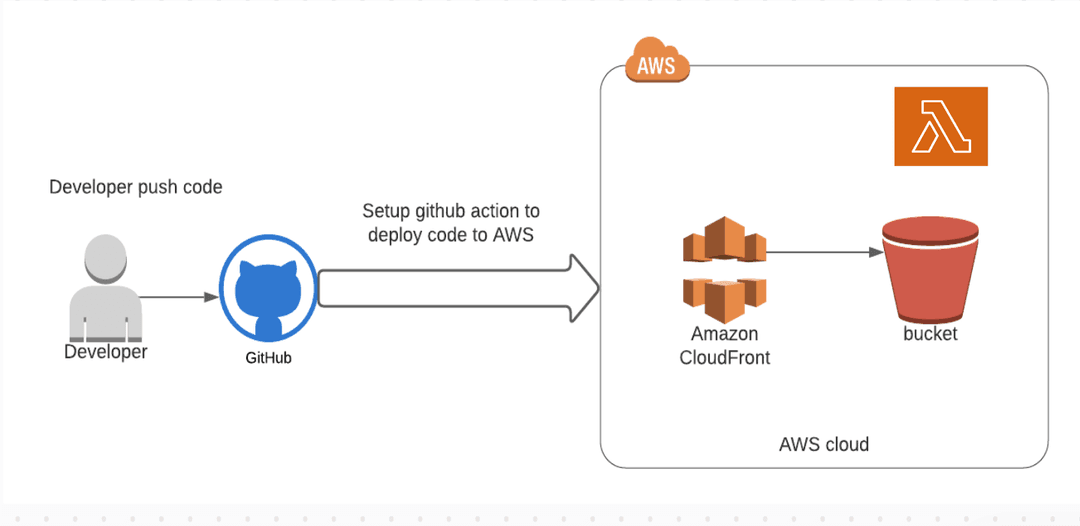
the instruction needed to build and deploy the application to AWS Lambda@Edge, S3 and CloudFront.
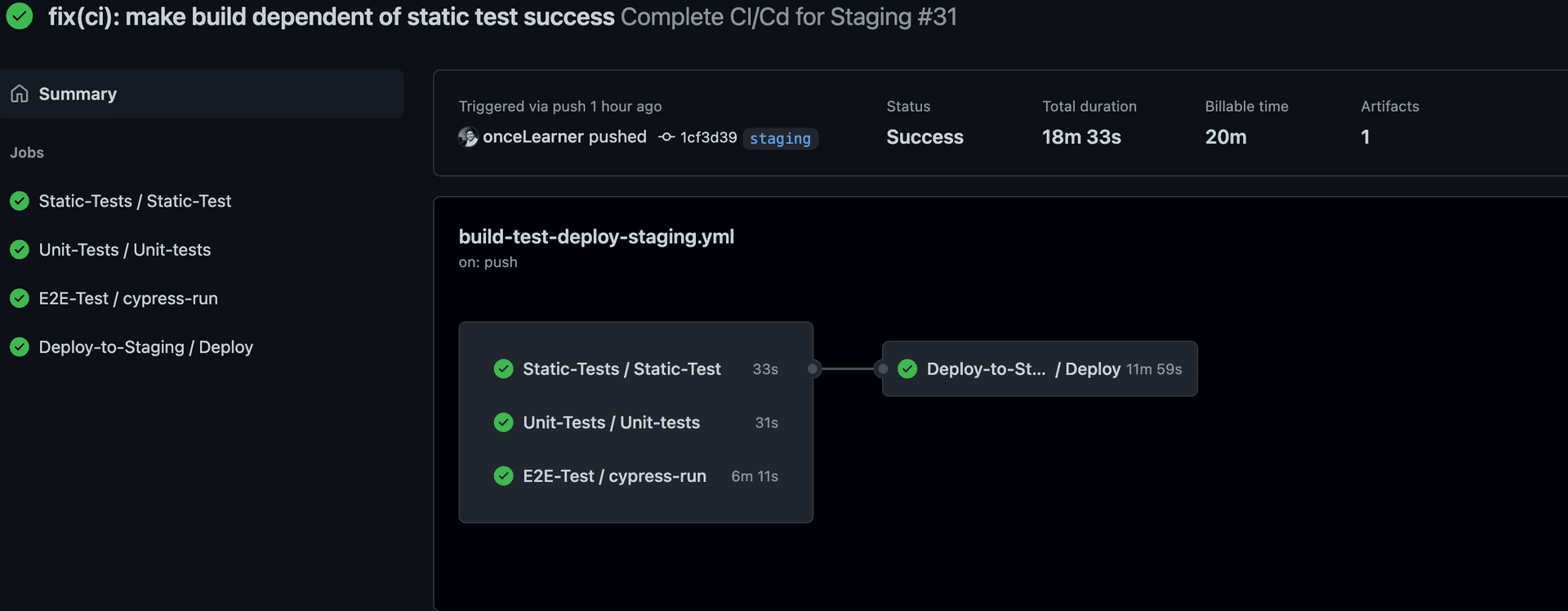
Finally, built-test-deploy-**.yml files are a sort of composition workflow that runs static, unit and integration test while deploying to AWS in case of
successfull tests and build.
Note that we use semantic-release.yml to generate release notes .
We need to add AWS AWS_ACCESS_KEY_ID and AWS_SECRET_ACCESS_KEY to github secrets.
Breaking down every worfklow
test-static.yml
Below the file content :
name: Static tests workflow

on:
  workflow_call:
    inputs:
      ENV:
        required: false
        type: string
  workflow_dispatch:
    inputs:
      ENV:
        required: false
        type: string

jobs:
  Static-Test:
    runs-on: ubuntu-latest
    steps:
      - name: Checkout
        uses: actions/checkout@v3
      # Install NPM dependencies, cache them correctly
      - name: Cache node modules
        id: cache
        uses: actions/cache@v3
        with:
          path: node_modules
          key: cache-node-${{ hashFiles('package-lock.json') }}
      - name: Setup Node
        uses: actions/setup-node@v1
        if: steps.cache.outputs.cache-hit != 'true'
        with:
          node-version: 16
      - name: Install packages
        if: steps.cache.outputs.cache-hit != 'true'
        run: npm install
      # let's run Static tests
      - name: run Static tests
        run: npm run lint:check
This workflow runs on workflow_call, meaning that once called from another workflow called the caller, the jobs are triggered .
After checking out the repository, we install packages and cache everything for future reuse, finally we run npm run lint:check to execute static tests on the whole project (linting+ typescript check).
test-unit.yml
Below the file content :
name: Unit Tests workflow

on:
  workflow_call:
    inputs:
      folder_name:
        required: false
        type: string

jobs:
  Unit-tests:
    runs-on: ubuntu-latest
    steps:
      - name: Checkout
        uses: actions/checkout@v3
      # Install NPM dependencies, cache them correctly
      - name: Cache node modules
        id: cache
        uses: actions/cache@v3
        with:
          path: node_modules
          key: cache-node-${{ hashFiles('package-lock.json') }}
      - name: Setup Node
        uses: actions/setup-node@v1
        if: steps.cache.outputs.cache-hit != 'true'
        with:
          node-version: 16
      - name: Install packages
        if: steps.cache.outputs.cache-hit != 'true'
        run: npm install
      # let's run unit test
      - name: run unit test
        run: npm run test:unit
This workflow runs on workflow_call, meaning that once called from another workflow called the caller, the jobs are triggered .
After checking out the repository, we install packages and run the tests.
test-e2e.yml
Below the file content:
name: Cypress Tests workflow
on:
  workflow_call:
    inputs:
      folder_name:
        required: false
        type: string

jobs:
  cypress-run:
    runs-on: ubuntu-latest
    steps:
      - name: Checkout
        uses: actions/checkout@v3
      # Install NPM dependencies, cache them correctly
      # and run all Cypress tests
      - name: Cache node modules
        id: cache
        uses: actions/cache@v3
        with:
          path: node_modules
          key: cache-node-${{ hashFiles('package-lock.json') }}
      - name: Setup Node
        uses: actions/setup-node@v1
        if: steps.cache.outputs.cache-hit != 'true'
        with:
          node-version: 16

      - name: Install packages
        if: steps.cache.outputs.cache-hit != 'true'
        run: npm install

      ## cache build
      - name: cache build
        uses: actions/cache@v2
        with:
          path: |
            ~/.npm
            ${{ github.workspace }}/.next/cache
          # Generate a new cache whenever packages or source files change.
          key: ${{ runner.os }}-nextjs-${{ hashFiles('**/package-lock.json') }}-${{ hashFiles('**.[jt]s', '**.[jt]sx') }}
          # If source files changed but packages didn't, rebuild from a prior cache.
          restore-keys: |
            ${{ runner.os }}-nextjs-${{ hashFiles('**/package-lock.json') }}-
      - name: build the  app
        run: npm run build

      # confirm there is no Cypress installed
      - run: npx cypress cache path
      # should return empty list of installed versions
      - run: npx cypress cache list
      # restore / cache the binary ourselves on Linux
      # see https://github.com/actions/cache
      - name: Cache Cypress
        id: cache-cypress
        uses: actions/cache@v1
        with:
          path: ~/.cache/Cypress
          key: cypress-cache-v2-${{ runner.os }}-${{ hashFiles('**/package.json') }}
      # now let's install Cypress binary
      - run: npx cypress install
      - run: npx cypress cache list
      # and run Cypress tests
      - name: Cypress run
        run: npm run test:e2e:ci
        # uses: cypress-io/github-action@v4
        # with
        #   # before running cypress, we should start the server.
        #   start: npm start
      # after the test run completes
      # store videos and any screenshots
      # NOTE: screenshots will be generated only if E2E test failed
      # thus we store screenshots only on failures
      # Alternative: create and commit an empty cypress/screenshots folder
      # to always have something to upload
      - uses: actions/upload-artifact@v1
        if: failure()
        with:
          name: cypress-screenshots
          path: tests/e2e/cypress/screenshots
      # Test run video was always captured, so this action uses "always()" condition
      - uses: actions/upload-artifact@v1
        if: always()
        with:
          name: cypress-videos
          path: tests/e2e/cypress/videos
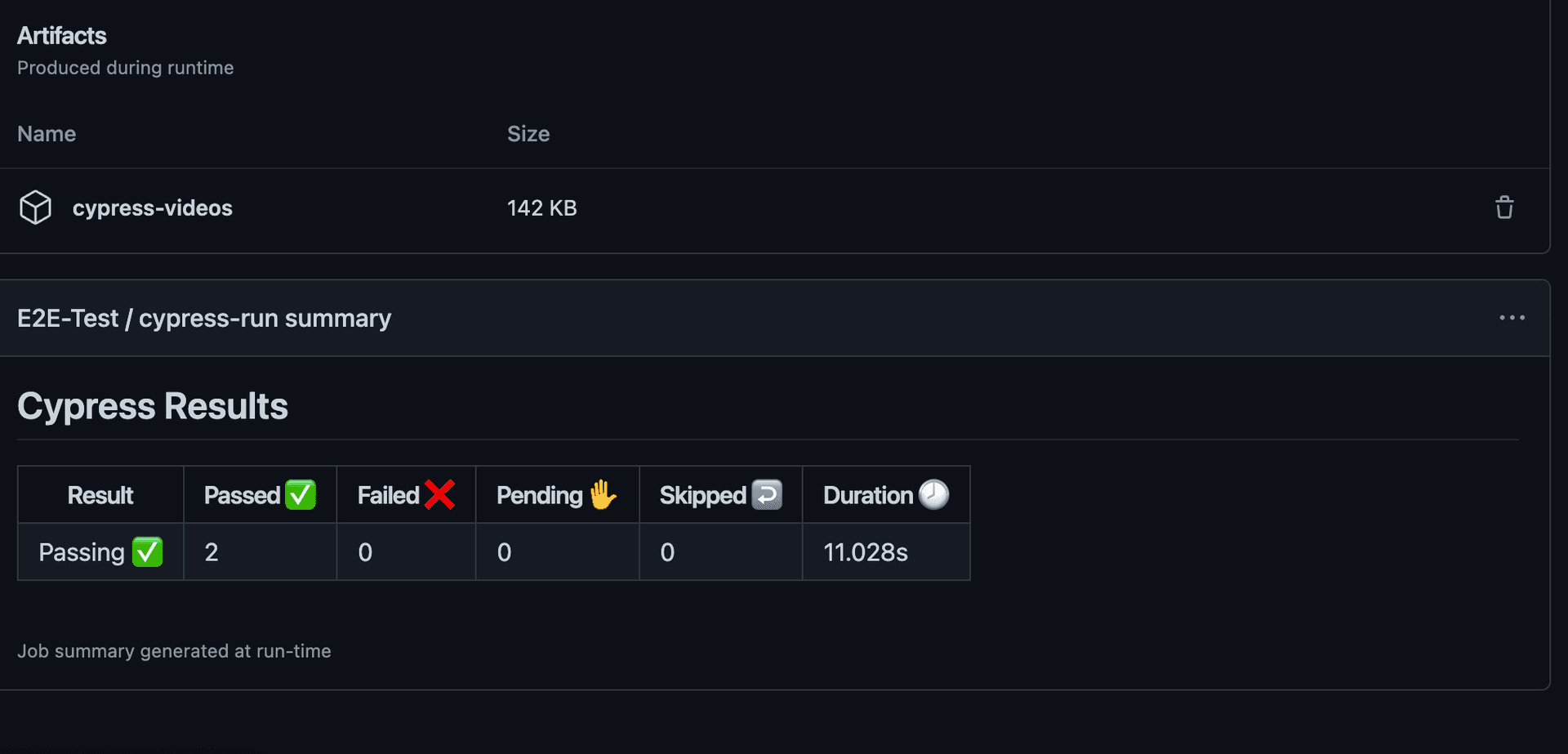
Once the workflow finished running, either successfully or stoping at en error/failed test, we will have vides + screenshots of failed tests.
deploy.yml
Below the file content:
name: Deploy workflow

on:
  workflow_call:
    inputs:
      ENV:
        required: true
        type: string
    secrets:
      AWS_ACCESS_KEY_ID:
        required: true
      AWS_SECRET_ACCESS_KEY:
        required: true

jobs:
  Deploy:
    runs-on: ubuntu-latest

    steps:
      - name: Checkout
        uses: actions/checkout@v3
      # Install NPM dependencies, cache them correctly
      - name: Cache node modules
        id: cache
        uses: actions/cache@v3
        with:
          path: node_modules
          key: cache-node-${{ hashFiles('package-lock.json') }}
      - name: Setup Node
        uses: actions/setup-node@v1
        if: steps.cache.outputs.cache-hit != 'true'
        with:
          node-version: 16
      - name: Install packages
        if: steps.cache.outputs.cache-hit != 'true'
        run: npm install

      - name: copy serverless-${{ inputs.ENV }}.yml into a serverless.yml file
        uses: canastro/copy-file-action@master
        with:
          source: 'serverless-${{ inputs.ENV }}.yml'
          target: 'serverless.yml'

      - name: Configure AWS Credentials
        uses: aws-actions/configure-aws-credentials@v1
        with:
          aws-access-key-id: ${{ secrets.AWS_ACCESS_KEY_ID }}
          aws-secret-access-key: ${{ secrets.AWS_SECRET_ACCESS_KEY }}
          aws-region: us-east-1

      - name: Deploy Next.js app
        run: |
          npx serverless@2.72.2
We first declare the workflow inputs and secrets. [ you cannot use secrets unless you pass them from the main ‘caller’ workflow]
After building, we use cananstro/copy-file-action plugin in order to copy serverless-prod.yml inside serverless.yml, wich is the file used by the serverless command.
We also use aws-actions/configure-aws-credentials@v1 in order to authenticate to AWS, make sure to configure github secrets.
Finally, to deploy, we execute the command npx serverless@2.72.2, [ Notice we use a specific version of serverless cli, because the latest version through an error, refer to this open issue: ]
build-test-deploy-prod.yml
Below the file Content
name: Complete CI/Cd for Production
on:
  push:
    tags:
      - v**
    branches: [main]

jobs:
  Static-Tests:
    uses: ./.github/workflows/test-static.yml
  Unit-Tests:
    uses: ./.github/workflows/test-unit.yml
  E2E-Test:
    uses: ./.github/workflows/test-e2e.yml
  Deploy-to-Production:
    ## only runs in case both unit and E2E tests are successfull .
    needs: [Static-Tests, Unit-Tests, E2E-Test]

    uses: ./.github/workflows/deploy.yml
    with:
      ENV: prod
    # need to pass secrets to [you already defined them in the 'called' yml file]
    secrets:
      AWS_ACCESS_KEY_ID: ${{ secrets.AWS_ACCESS_KEY_ID }}
      AWS_SECRET_ACCESS_KEY: ${{ secrets.AWS_SECRET_ACCESS_KEY }}
Since We have separate each workflow, now we need to reuse them, while providing some needed variables to some workflows where inputs is required.
After runnig thie workflow, in case every workflow runs correctely, we got The following result: