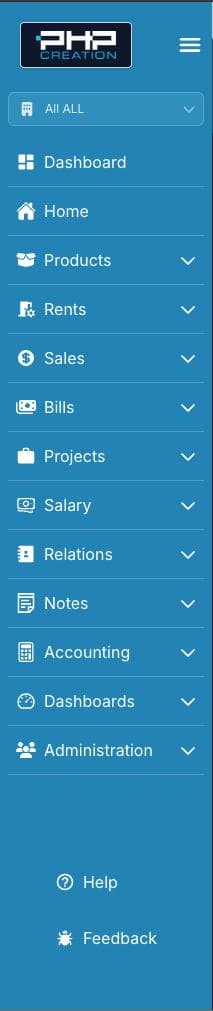
Standardized Sidebar Links
Every CRUD v2 project defines its sidebar in src/sitedata/SidebarMenu/index.tsx as a SidebarMenus(tenant: string) function. The sections must appear in this order across all projects.
1. Dashboard
Top-level link to the shared dashboard app for the current tenant.
{
  title: "Dashboard",
  icon: <BiSolidDashboard className="h-5 w-5 mx-auto" />,
  link: `https://${tenant}.${env}dashboard.phpr.link`,
}
env is derived from NEXT_PUBLIC_URL_ENV at the top of the function:
const env =
  process.env.NEXT_PUBLIC_URL_ENV === "."
    ? process.env.NEXT_PUBLIC_URL_ENV?.replace(/\./g, "")
    : process.env.NEXT_PUBLIC_URL_ENV?.slice(1);
2. Home
Top-level link to the current app’s root.
{
  title: "Home",
  icon: <IoHome className="h-5 w-5 mx-auto" />,
  link: "/",
}
3. App Menu
The main feature modules for this app. Each module is a top-level item with a subMenus array. Both the parent and each submenu entry take a role key — items are hidden when the user lacks that role.
{
  title: "Products",
  icon: <FaBoxOpen className="h-5 w-5 mx-auto" />,
  role: "ROLE_MOD_PRODUCT_LISTING",
  subMenus: [
    {
      title: "Products",
      link: "/products",
      icon: <FaBoxOpen className="h-5 w-5 mx-auto" />,
      role: "ROLE_MOD_PRODUCT_LISTING",
    },
    {
      title: "Inventories",
      link: "/inventory-entries",
      icon: <MdInventory2 className="h-5 w-5 mx-auto" />,
      role: "ROLE_MOD_INVENTORY_ENTRY_LISTING",
    },
    // ...related links (section 4)
    // ...documentation link (section 5)
  ],
}
4. Related Links
Links placed inside submenus after the primary entity entries. Three kinds:
Links to other entities in the same app:
// inside "Sales" subMenus
{
  title: "Clients",
  link: "/person-clients",
  icon: <FaUserSecret className="h-5 w-5 mx-auto" />,
  role: "ROLE_MOD_PERSON_CLIENT_LISTING",
},
Links to other CRUD v2 apps (use the env/tenant URL pattern):
// inside "Administration" subMenus
{
  title: "PHPR Users",
  link: `https://${tenant}.${env}account-crud-v2.phpr.link/en/users`,
  icon: <FaUserGroup className="h-5 w-5 mx-auto" />,
  role: "ROLE_ADMIN",
},
{
  title: "Ticket Users",
  link: `https://${env}ticket-v2.phpr.link/en/users`,
  icon: <FaUserGroup className="h-5 w-5 mx-auto" />,
  role: "ROLE_ADMIN",
},
Documentation links at the end of a submenu (no role required):
{
  title: "Documentation",
  link: "https://phpreaction.com/fonctionnalites-de-phpreaction/fonctionnalites-de-ventes/#CommentFaire",
  icon: <PiBookOpenTextThin className="h-5 w-5 mx-auto" />,
}
5. Support & Help
These are rendered by the SidebarMenu component itself, pinned to the bottom of the sidebar. They are not configured in the SidebarMenus array.
Help button — opens HelpModal (shortcut Alt+?). Only renders when helpModalSections is passed to SidebarMenu with at least one entry.
<SidebarMenu
  helpModalSections={[{ title: "Shortcuts", items: [...] }]}
  // ...
/>
Feedback button — always present regardless of configuration. Opens FeedbackForm (shortcut Alt+F).
Result